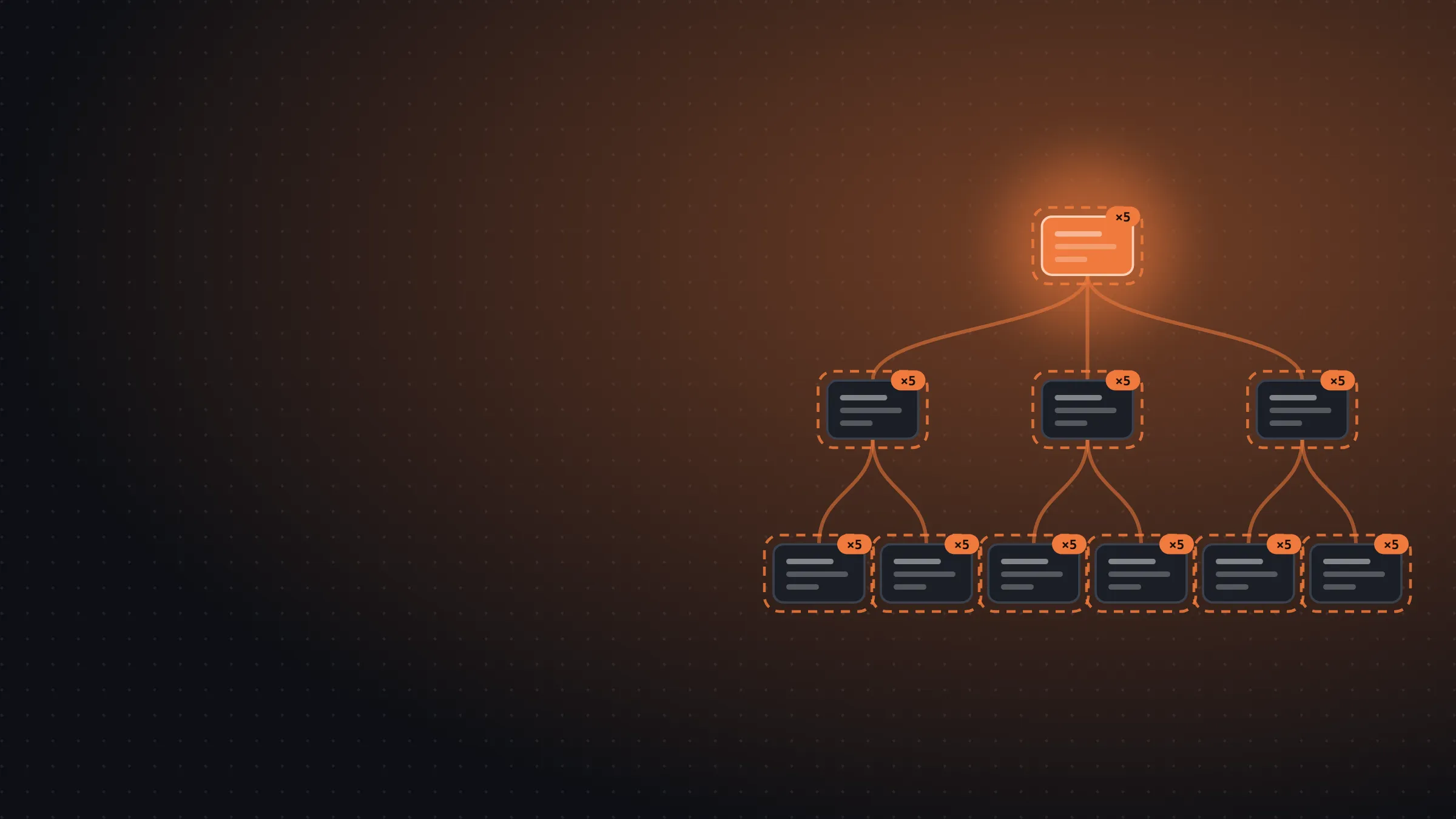
This is how I work today: I think each idea through with /wayfinder or /grill-with-docs, I build an HTML prototype when there’s a screen to decide on, I turn what comes out of that into tickets, and a queue of agents builds them and merges their PRs while I think about the next thing.
When I started building Peak Health with agents, the first thing I installed was Matt Pocock’s skills. A skill is a file of instructions the agent loads when it needs it, and Matt’s are made for working through ideas in a structured way and then building them. The one I used most was /grill-with-docs, which asks you one question after another until you and the agent mean the same thing by every word in the project, and writes it all down in a CONTEXT.md (now GLOSSARY.md) that every later session reads. With that in place, the agent builds what you meant, even when the words you typed said something slightly different.
materialize: my skills on top of Matt’s
Back then Matt had far fewer skills than he has now. There was no /implement, for example, so the planning side was well covered and I had to put the building side together myself in every session. So I wrote my own skills on top of his, and that’s where materialize came from.
I took the idea of having different flows for different sizes of work from HumanLayer. Fixing a bug shouldn’t go through the same process as a feature with a spec, so materialize has a single skill, /materialize, that recommends how much ceremony each idea needs: QUICK for a one-line change, which goes straight to implementing and opening the PR, STANDARD for a normal feature, with a short document that defines it, and SPEC when you need to define and write the product before touching any code. Each phase loads only when you reach it, so the agent’s context holds only what it needs at that point.
Over time I noticed that Matt already had something similar, though quite different, in his new /wayfinder skill, which plans work too big for one session as a map of open questions.
Back to Matt’s skills
I dropped materialize because Matt’s skills got better at what I needed. /implement, /to-tickets and /wayfinder arrived, and they were simpler than what I had built. Keeping my own skills meant keeping another project alive, with its phases, its references and the sources I kept pulling ideas from, and that time was coming out of Peak Health, the thing I want to build. Matt’s skills already did what I needed, and he maintains them.
The queue that builds issues without me watching
With /wayfinder and /to-tickets, issues come out defined well enough that someone can build them without anyone watching. Matt calls this AFK work, for away from keyboard, in his dictionary of AI coding. What I was missing was an automatic way to build those AFK issues without me supervising them. If the issue already says what to do, how to check it and which other issues it depends on, I don’t need to open a session for each one. So I set up an agent that picks those issues up one after another, and I keep the work that needs me.
In Peak Health you start it with pnpm queue, a Node script:
pnpm queue --dry-run   # which issues it would pick and in what order, without starting anything
pnpm queue             # picks one, builds it and stops when its PR merges
pnpm queue --limit 3   # the same with three, one after another
pnpm queue --forever   # as many as it can; when none are left, waits ten minutes and checks again
pnpm queue --status    # which runs are going
pnpm queue --stop      # stops after the current issue
pnpm queue --restart   # starts again with the new code, also after the current issue
Each round goes roughly like this. It reads the open GitHub issues labelled ready-for-agent, skips the ones that have an assignee or an open blocker, and takes the critical ones first and then the oldest. It assigns the issue to itself and leaves a comment saying it took it and when. Then it creates a git worktree in .worktrees/issue-<number> and runs claude -p inside it with the issue in the prompt. The session reads the same rules, skills and hooks I work with, builds the issue with /implement, gets through the pre-push checks, opens the PR, answers every CodeRabbit review comment with the /address-pr-comments skill and, once the required checks pass and CodeRabbit approves, merges its own PR. If CodeRabbit has hit its limit and won’t review, the session answers whatever is open, merges when the other checks pass and leaves a note that nobody reviewed that commit. Then the queue reads the list again, so if I open a critical issue in the middle of a round, that one goes next.
Letting a session merge its own PRs might sound risky, but everything the queue builds goes behind feature flags, so merging is safe: the new code reaches production switched off and nobody can use it until I turn the flag on.
The checks run locally on my Mac, in a git pre-push hook, before the PR exists. At first only one run went at a time, but now I can have up to three terminals running pnpm queue on my Mac. Each one takes one of three slots, two never take the same issue, the pre-push checks run in turn in the order they arrive, and only one run gets the phone at a time, while it runs its Maestro tests.
And when the issue leaves something undefined, like which feature flag a new section uses or how to word a new piece of text the athlete will see, the session doesn’t make it up: it leaves the question as a comment on the issue and stops without writing any code. The queue then labels it needs-info and removes ready-for-agent, so the issue doesn’t come back to the queue until I answer.
Jev picks the model for each session
Not every issue needs the same model. To choose one I use Jev, a classifier model from TypeSafe: you give it something unstructured and it gives you back a typed answer with its probability. In Peak Health I use it through jev-model-router, a Claude Code mod that asks Jev three things about the prompt before the turn starts: whether the work is mechanical, normal or hard, how much reasoning it needs, and whether doing it could change production, move money or touch data you can’t get back. Jev never sees a model name, only the description of the work.
The queue starts every run with --model opus and lets the router pick the main session’s model on the first turn, with the whole issue in the prompt. Depending on what Jev answers, the session uses Opus, Sonnet or Haiku. If Jev sees risk, it picks the big model and raises the reasoning to high no matter what. The router also sets the reasoning for each turn, from low to max. critical issues skip the router and stay on Opus. And if a run ends on a cheaper model with no PR and no comment, the queue retries the issue in the same worktree, this time on Opus and without the router.
The sub-agents each session starts also go through the router. In the queue I got the opposite of what I expected: before, almost all of them ran on Sonnet, and since the router arrived almost all of them run on Opus.
And every ten merged PRs, the queue starts a retro session. It reads those PRs with their comments and reviews, the queue log and the sessions, and if it finds a problem that keeps coming back and that no open issue covers, it opens an issue with the change to rules, checks or skills that would have prevented it.
What I learned building the queue
None of this worked on the first try. The first version of the queue left PRs unopened, picked up tickets that were still blocked and kept taking issues when something was failing underneath, and every time something like that happened I fixed it and started it again. It took quite a few rounds before it could build and merge issues from start to finish without me watching, and most of what I know about leaving an agent to work on its own I learned in those rounds.
HTML prototypes before building
The queue can’t decide for me what a screen that doesn’t exist yet should look like. If an issue reaches the queue without it being clear what the athlete will see, the session has to make it up, and what an agent makes up halfway through an issue is almost never what I had in my head. And if I end up throwing the screen away, the queue’s speed doesn’t help me at all.
So before I ask for anything, I prototype. I mean an HTML page that doesn’t do anything but shows the interface I’m picturing. I build it with Claude in an artifact, which I can open in the browser as soon as it’s written, and from there we decide on concrete ideas: I ask for several versions of the same screen, compare them, throw some out, ask for another round with what I liked from each one, and keep going until I have something I’m happy with. Throwing away an HTML page that isn’t connected to anything costs me nothing, so I can try seven versions of a screen.
When the prototype is part of a /wayfinder map, the page goes into the repository’s prototype/ folder, on its own branch with a draft PR that nobody merges, and the issue records the option I picked. Those files don’t even go through the pre-push checks, because they’ll never reach production. The decision stays, though: once the map has no open questions left, /to-tickets turns it into tickets that already say what the screen looks like, and those are the tickets the queue picks up.
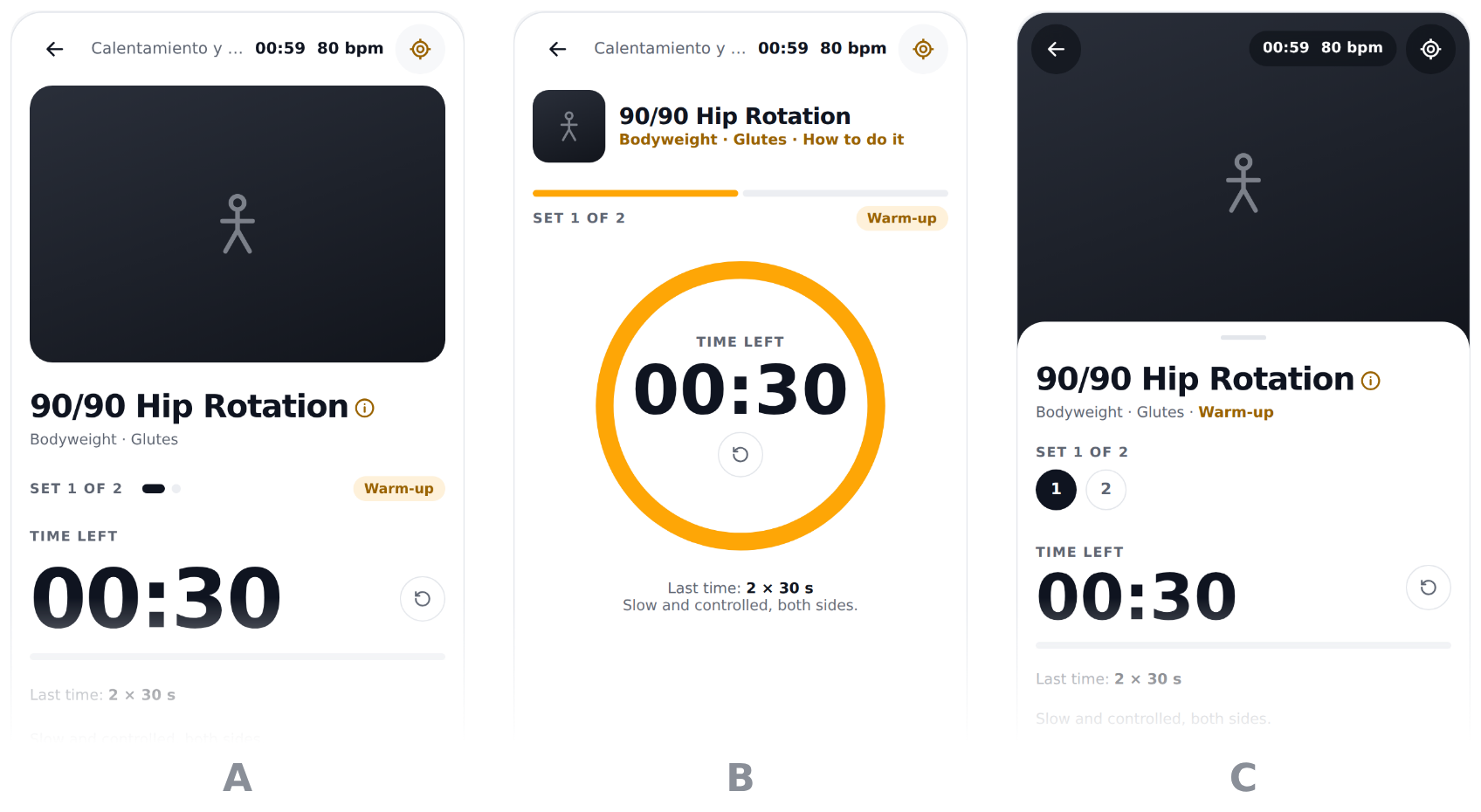
One example is the set screen on the phone, the one you look at while you train. It had to work for four kinds of set: timed, reps, reps with tempo and breathing, and a breathing set. The prototype started with three layouts. A stacked everything in one column, with the exercise photo in a card and the time large underneath. B kept the photo small next to the name and put the time inside an orange ring in the middle of the screen. C filled the top with the photo and slid a white sheet up over it with the name, the sets and the time.
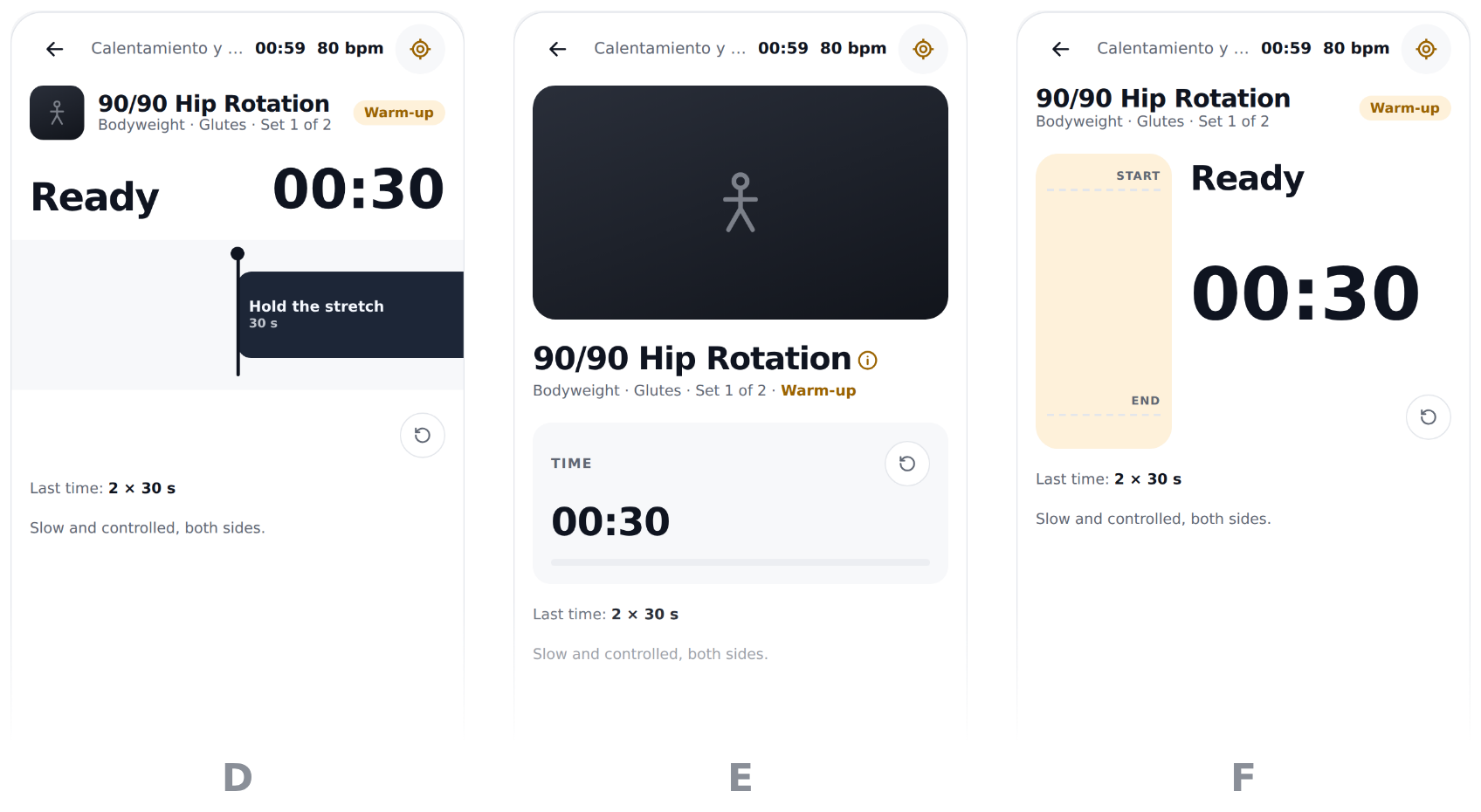
From there I kept giving it ideas and three more came out. D turned the set into a timeline, with “Ready” and the time in large type above a track that shows how long each part lasts. E went back to the photo in a card and put the time in its own box under the name. F put a tall bar next to the time that runs from START to END, so you could see the movement as it happens.
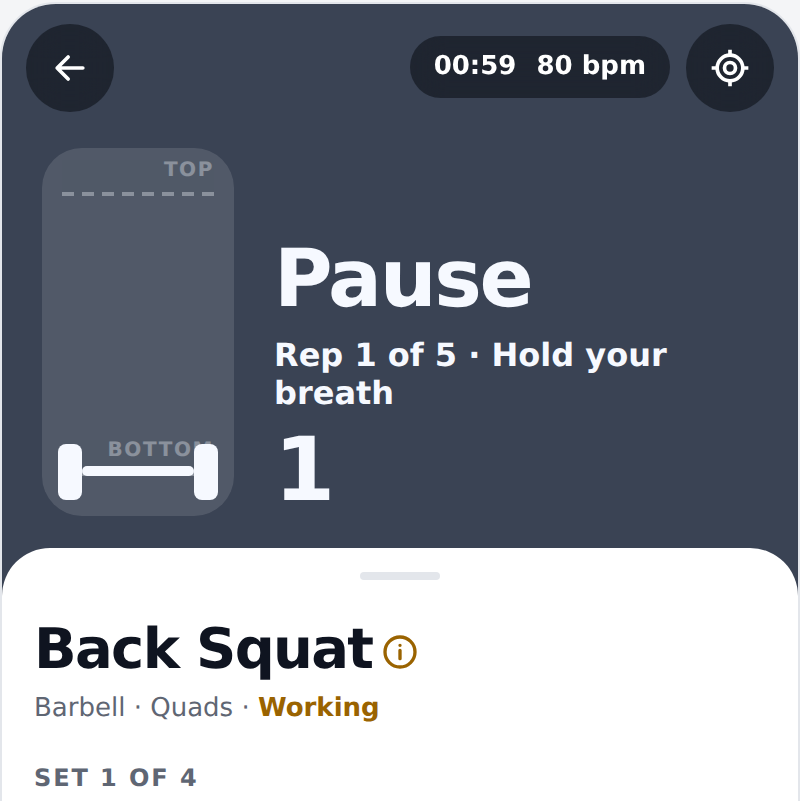
I went with G, which is C’s sheet with the buttons in a bar at the bottom, where only “Log” stays when you scroll. What changes is the photo area while the set is running: in a timed set it becomes a countdown inside a ring, in a tempo set a bar moves up and down with each phase of the rep, and in a breathing set a circle grows and shrinks with your breathing. The prototype has all seven versions, and you move between them with the arrow keys.
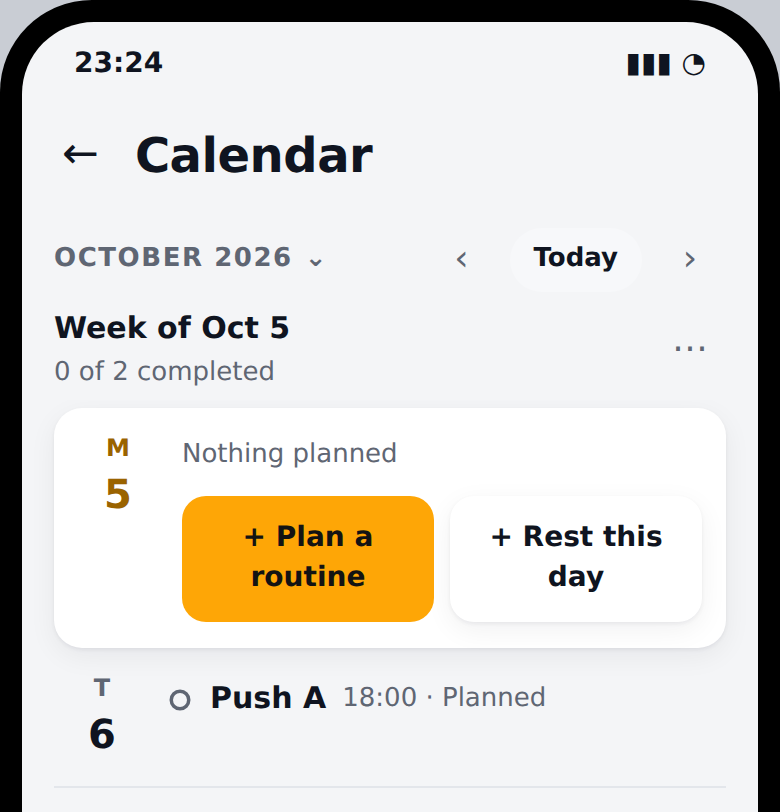
The new calendar went the same way, but in two rounds. The first had six ways to show the days: a month that opens when you tap its name, a handle under the week that pulls the month down, the month on a separate sheet, the month always on screen with the week marked inside it, routine names in the week strip, and the one I picked, D, which drops the strip and shows the seven days as a list, each one written out in words.
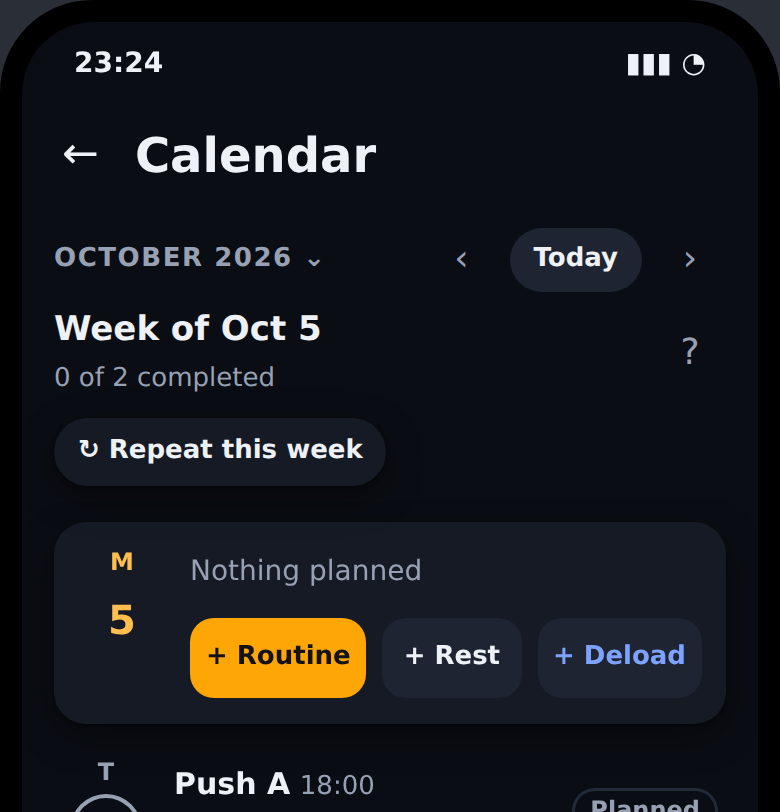
In the second round, on top of that same list, I tried three ways of saying what happened each day (a coloured word, a ring around the date or a short sentence) and three places for the deload and for repeating the week (in the menu, in a card at the end of the week or on the day itself). I went with the ring on the date and with those buttons on the day itself and on each session. That decision turned into five tickets, and they’re the ones waiting their turn in the queue right now.
How I work now
I hardly open sessions to build features or fix bugs anymore. Since the queue arrived I’ve barely typed /implement by hand, and over the last month what I’ve used most is /wayfinder and /triage, each in its own session and often several at once. I use /wayfinder when I have a big idea that still has open questions, /triage to sort the issues as they come in, or I just talk ideas through with the agent, and whatever comes out of that ends up as ready-for-agent tickets the queue picks up on its own. I also use Claude on my phone while I’m using the real app, when I find a problem or think of a new idea or an improvement.
I used to spend the day reviewing what the agent was writing. Now I spend it deciding what to build and how it should look. What about you, how much of what you do every day could already be sitting in a queue?